MCTOOLBOX
MC ToolboxMC TOOLBOX

Just Enough Items (JEI)

The ultimate recipe & item browser for Minecraft: instant recipe lookup (R), reverse uses (U), bookmarking (A), and powerful search syntax.

12 min readNeoForge · Forge · Fabric1.21+ · 26.x

Just Enough Items (JEI) is the essential recipe browser and item catalog for Minecraft Java Edition. It gives you instant access to every crafting, smelting, brewing, and machine recipe in your world without ever needing to open an external wiki. Search through thousands of items with advanced prefix filters, pin recipes with bookmarks, and auto-transfer ingredients into crafting tables with a single click.

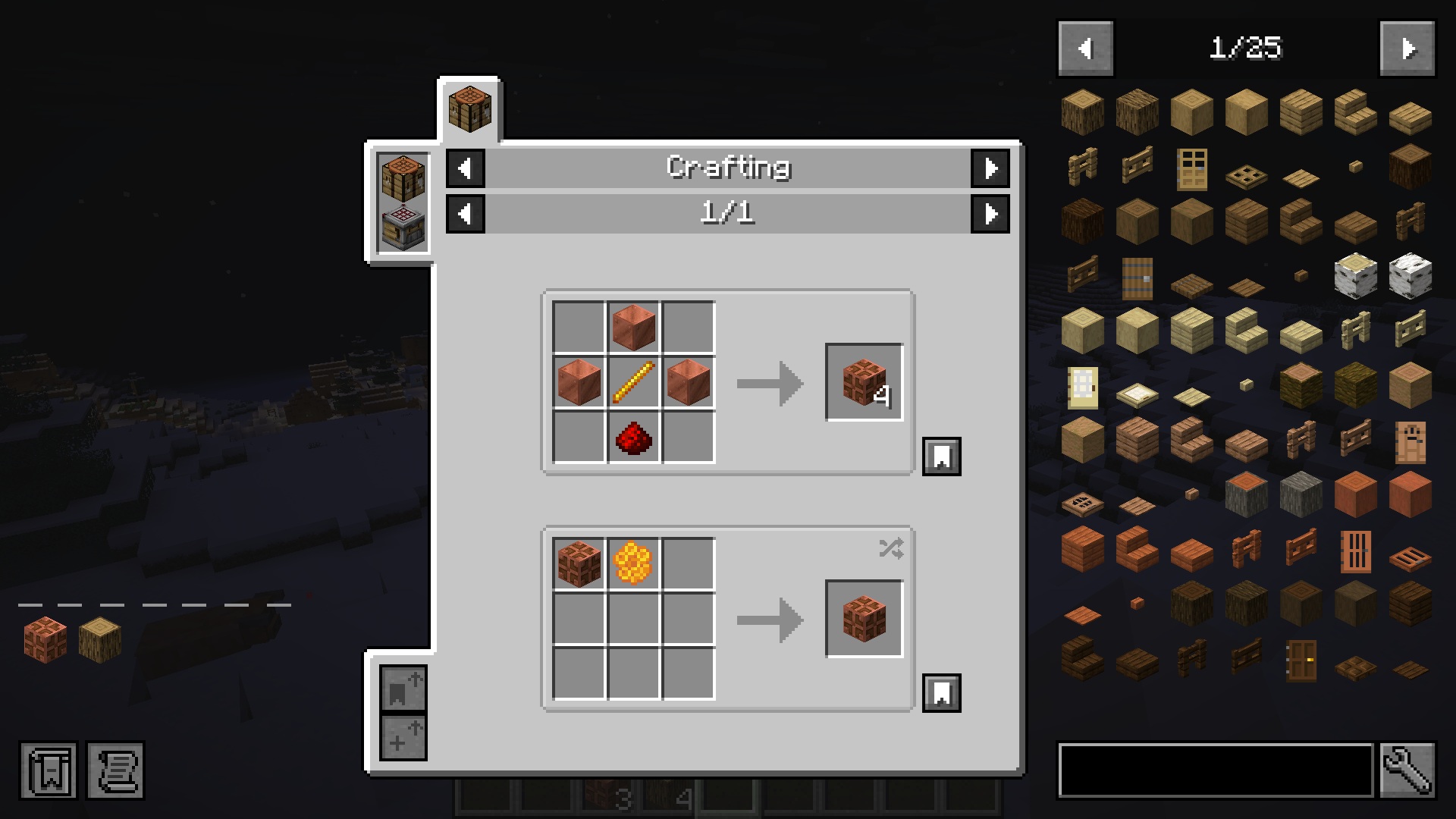
Just Enough Items in-game recipe viewing overlay and item browser panel
Just Enough Items (JEI) in action: recipe category tabs at the top, crafting grid in the center, and complete searchable item catalog on the right.

Why JEI Is the Most Essential Mod in Minecraft History

Just Enough Items (JEI) by mezz is the gold-standard recipe viewer and item browser for Minecraft Java Edition. With over 600 million downloads, it is the cornerstone of virtually every modpack. Rather than forcing you to alt-tab to a web browser or memorize thousands of complex crafting trees, JEI renders an intuitive, searchable catalog of every block, item, potion, and machine recipe directly inside your inventory screen.

1. Instant Recipe Lookup (R Key)

Hover over any item in your inventory, chest, or JEI catalog and press R to instantly see how to craft, smelt, brew, or forge it.

2. Reverse Use Lookup (U Key)

Press U on any raw material (e.g., Redstone, Blaze Rod) to see every recipe, fuel burn, or machine that consumes it.

3. Recipe Bookmarking (A Key)

Press A to pin complex crafting recipes to a dedicated left sidebar, keeping your active building goals organized.

4. 1-Click Auto-Crafting ([+] Button)

Clicking the [+] button inside any recipe automatically transfers the required ingredients from your inventory into the crafting grid.

STEP 01Interactive

How JEI Visualizes Different Recipe Categories

From standard 3x3 crafting to smelting, brewing, and anvil combining.

JEI does not just display standard crafting tables. It natively detects and organizes recipes across dozens of distinct mechanics:

3×3 Shaped Crafting (Piston)
Page 1/5
[+] Auto-Fill
PistonPress R

Pressing R on any item displays its exact 3x3 pattern. Click any ingredient to view how to make that ingredient.

Click [+] button to automatically move ingredients from your inventory into the crafting table.
JEI Category: minecraft:crafting (Shaped)
PRO TIP: Navigating Recipe History
When clicking through deep recipe chains, press Backspace at any time to return to the previous recipe page you were viewing!
STEP 02Search Secrets

Mastering the Search Bar with Search Prefixes

Filter through 10,000+ modded items in seconds using prefix operators.

In large modpacks with thousands of items, typing a plain name will often yield overwhelming results. JEI includes a suite of powerful search operators:

PrefixFunctionExample QueryWhat It Finds
@modidFilter by specific Mod ID@createOnly items added by Create mod
#tagSearch OreDict / Item Tags#c:ingotsAll registered metal ingots across all mods
%potionFilter by Potion Effect%speedAll Speed potions, arrows, and foods
&tooltipSearch inside Item Tooltip text&durabilityItems mentioning durability in their description
| (OR)Match either termdiamond | netheriteBoth Diamond and Netherite gear simultaneously
- (NOT)Exclude unwanted termsore -deepslateAll ores except deepslate variants
PRO TIP: Double-Click Search Bar (Ingredient Highlighting)
Double-clicking the JEI search bar turns it yellow. This activates Search Highlighting: your inventory will darken all items except the ones that match your current search query! Double-click again to turn it off.
STEP 03Controls

Keyboard Shortcuts and Mouse Controls Cheat Sheet

Master these essential keybinds to speed up your crafting workflow.

Key / ActionDefault BindingFunctionality
Show RecipeR (or Left-Click)Opens the crafting recipes that create the hovered item.
Show UsesU (or Right-Click)Shows every recipe that uses the hovered item as an ingredient.
Bookmark ItemAPins the hovered item/recipe to the left bookmark sidebar.
Focus Search BarCtrl + FImmediately jumps typing focus into the search bar.
Toggle Cheat ModeCtrl + Click WrenchAllows 1-click grabbing of full stacks directly from the catalog.
Auto-Fill Crafting GridShift + Click [+]Crafts as many batches as possible automatically.
STEP 04Server Info

Multiplayer Servers & Minecraft 1.21+ Recipe Sync

Why JEI should be installed on both client and dedicated server.

Starting from Minecraft 1.21.2, Mojang redesigned the underlying recipe network protocol. On multiplayer servers:

  • Modded Servers (Forge / NeoForge / Fabric): Installing JEI on the server allows instant synchronization of all custom datapack recipes, modded machines, and 1-click [+] auto-crafting transfers for all connected players.
  • Pure Vanilla Servers: If playing on a vanilla SMP that does not permit server mods, JEI operates in client-only mode, seamlessly reading vanilla recipes while you play.

Frequently Asked Questions

Keybinds, search operators, bookmarking, and multiplayer compatibility

Official Downloads

mezz · Official JEI Author

Just Enough Items (JEI) for NeoForge, Forge, and Fabric. Select your game version and mod loader below to download official files directly.

Official Release Channels

Choose the exact version matching your Minecraft install.

Loaders: NeoForge, Forge, FabricVersions: 1.21+ · 26.x610M+ downloads