Community Assessment & Real-World Verdict: The Honest Pros & Cons
Synthesizing real-world community insights, technical player benchmarks, and mod developer feedback.
Across the global Minecraft player community, modpack creators, and technical server administrators, the verdict on Fabric vs. Forge / NeoForge is clearly defined based on real-world use cases:
- Unrivaled Client FPS: Fabric is the native home of the Sodium + Iris + Lithium optimization stack. Potato PCs routinely jump from 30 FPS to 180+ FPS with full shader support.
- Day-One Snapshot Updates: When Mojang drops a weekly snapshot or major update, Fabric builds are typically ready within hours, while monolithic loaders take weeks.
- The Gold Standard for Technical SMPs: Technical server communities (e.g. SciCraft) favor Fabric + Lithium over Paper/Purpur because it delivers 20.0 TPS while preserving 100% vanilla redstone, mob caps, and perimeter quarry mechanics.
- ⚠️Fewer 'Kitchen-Sink' Mega Modpacks: If you are looking for 400+ mod monolithic packs (e.g., All The Mods 10) with dozens of interlinked tech and magic systems, NeoForge/Forge remains the primary hub.
- ⚠️Mixin Collision at Extreme Scale: When running 200+ complex gameplay mods, resolving Mixin target conflicts requires familiarity with crash logs and bytecode debugging.
Under the Hood: Mixins, Knot ClassLoader & Zero-Bloat Runtime
Why Fabric launches in under 3 seconds while legacy mod loaders take minutes.
Traditional mod loaders operated by creating monolithic patches directly against the deobfuscated Minecraft codebase. Fabric revolutionized modding with three architectural pillars:
- SpongePowered Mixin Bytecode Transformation: Rather than replacing entire Minecraft classes, Fabric mods declare surgical bytecode modifications (
@Inject,@Redirect,@ModifyVariable). This allows hundreds of mods to alter the same core method simultaneously with zero class collisions. - Knot ClassLoader: A high-performance classloader that manages classpath isolation, eliminating classpath scanning delays during game boot.
- Zero Hardcoded Game Logic: Because Fabric Loader contains zero gameplay mechanics, when Mojang releases a new Minecraft version, the Loader can boot the new update almost immediately.
Mod Loader Comparison Matrix: Fabric vs. Forge vs. NeoForge vs. Quilt
Benchmark breakdown: startup speed, idle memory footprint, and ecosystem strengths.
| Metric |  Fabric Fabric |  NeoForge NeoForge |  Forge Forge |  Quilt Quilt |
|---|---|---|---|---|
 | ⚡ 2-4 seconds | 8-15 seconds | 20-45 seconds | 3-6 seconds |
 | 🍃 15-30 MB | 120-250 MB | 200-400 MB | 30-50 MB |
| Same day / Instant | Major releases only | Major releases only | Same day |
 | Sodium / Iris / Client / QoL / Vanilla+ | Heavy Tech & Magic packs (1.20.4+) | Legacy 1.12 - 1.20 packs | Modular Fabric fork ecosystem |
 | Direct CLI / Meta API | Installer script | run.bat / run.sh | Direct CLI |
Client Installation: Official Installer GUI
Set up your vanilla Minecraft Launcher profile in under 60 seconds.
Installing Fabric Loader on the standard vanilla Minecraft Launcher is straightforward:
- Download the Fabric Installer: Grab the official installer executable (.exe for Windows or universal .jar for macOS/Linux) from the official FabricMC GitHub repository.
- Select Minecraft Version: Launch the installer, select the Client tab, choose your desired Minecraft version (e.g. 1.21.4), and select the recommended Loader build.
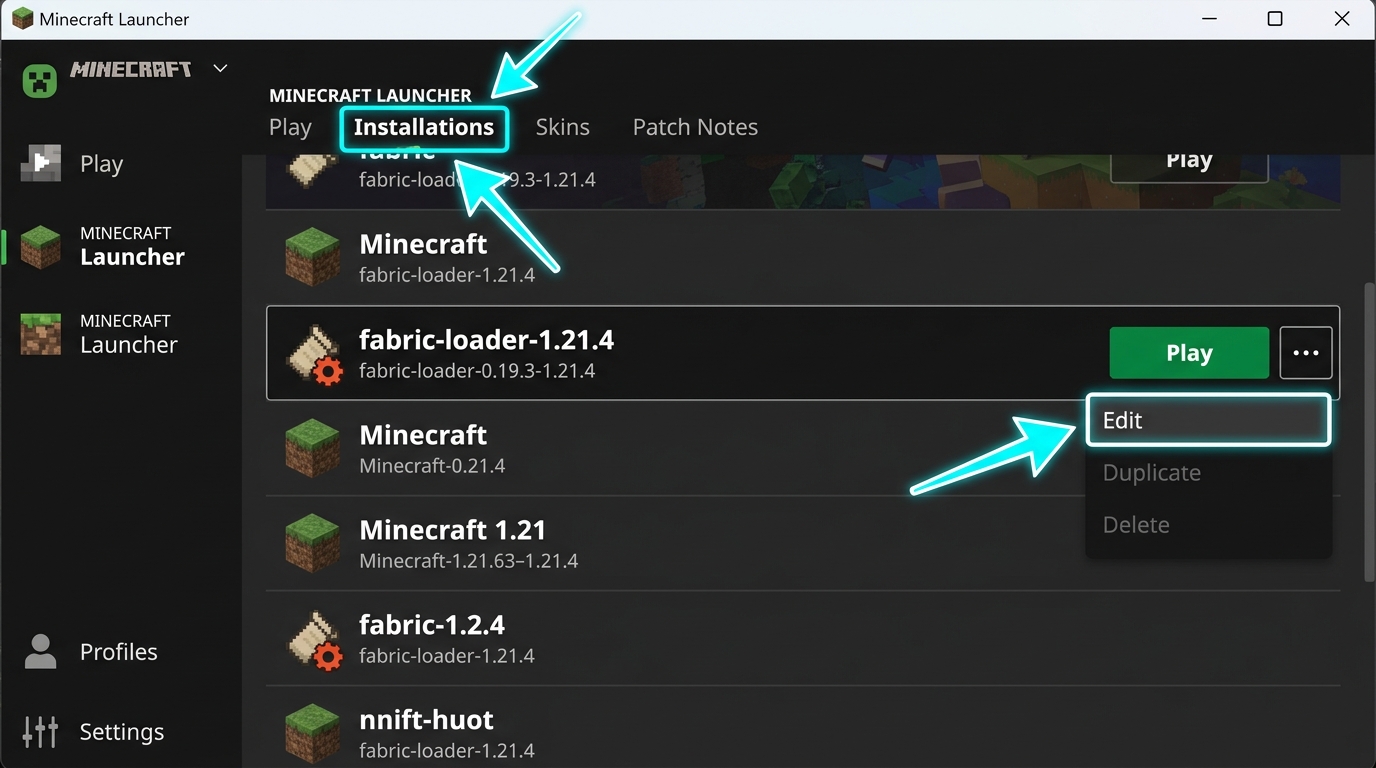
- Click Install: The installer generates a dedicated
fabric-loader-1.21.xprofile directly inside your Minecraft Launcher. - Add Fabric API: Open your
.minecraft/modsfolder and place the matching Fabric API jar inside before launching.
Dedicated Server Setup: Headless Installer & Meta API
Deploying Fabric server jars on Linux VPS, Docker, and Pterodactyl hosting panels.
For dedicated Linux servers or Docker containers where no graphical display is available, Fabric provides a headless CLI installation command:
This single command downloads the vanilla Minecraft server jar, fetches the matching Fabric Loader libraries, and generates the entrypoint executable: fabric-server-launch.jar.
JVM Optimization Flags & Mixin Conflict Debugging
Eliminate garbage collection micro-stutter and reveal deobfuscated crash logs.
Enabling Generational ZGC virtually eliminates garbage collection freeze spikes:
Enables deobfuscated method names in crash reports to pinpoint conflicting mods: