April 6, 2026
Minecraft Firework Rockets: Colors, Effects, and Crafting
From Elytra boosts to massive server celebrations, master the science of fireworks with my generator.
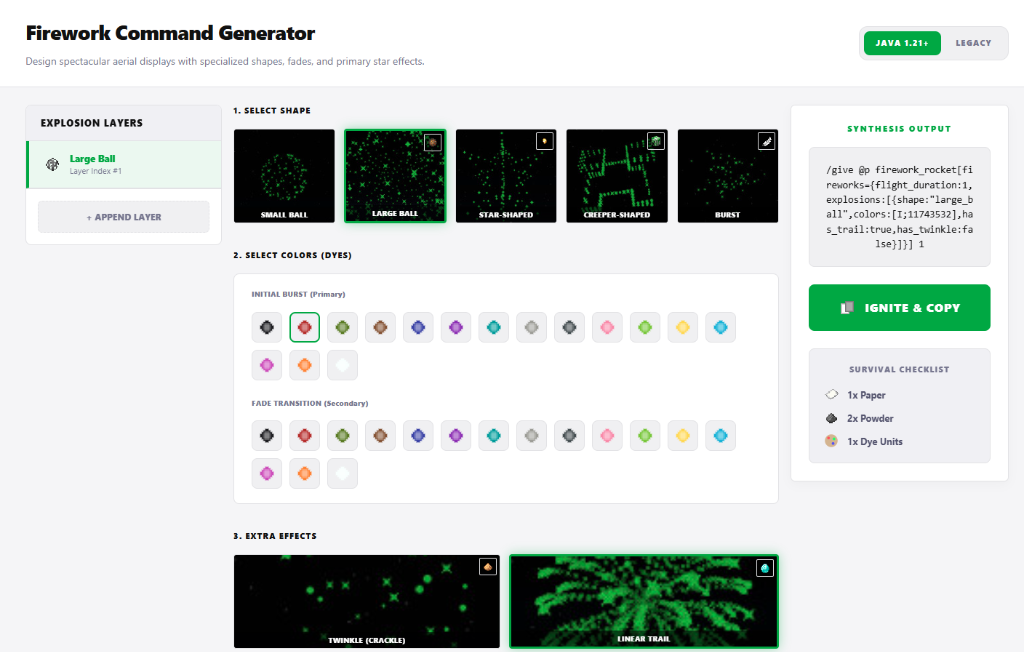
We’ve all had that terrifying moment where we are soaring thousands of blocks over an ocean with our Elytra and we suddenly realize we have run out of rockets. It is one of those survival experiences that either ends with a stressful landing on a tiny island or a long swim back to shore. But beyond just being fuel for our wings, fireworks are one of the most technical and rewarding systems in the game for events and celebrations. I was talking to a server owner recently who wanted to put on a show for their one year anniversary, and they were struggling with the ridiculous complexity of crafting firework stars with different fade effects. Honestly, remembering the recipe for a "Large Ball, Lime Green, Pink Fade, Twinkle, Trail" firework star is enough to give anyone a headache. That is why I built the Firework Rocket Lab. I wanted a way to pick the colors and effects visually and get the exact command or recipe instantly.
Flight Duration vs. Explosion Beauty
There is a massive difference between a rocket made for travel and one made for a show. If you are just trying to get from point A to point B, you should be using "Flight Duration 3" rockets, which are made with three pieces of gunpowder and one piece of paper. These give you the longest boost for your buck. I see a lot of newer players using firework stars in their travel rockets, which is a huge waste of materials and actually makes you take damage from the explosion if you're not careful. For my personal survival gear, I always have a chest fully stocked with simple, color coded rockets for traveling. But when it comes to a server event, the "star" is everything. I love using the "Trail" and "Twinkle" effects together. The twinkle effect adds a crackling sound to the explosion that makes it feel much more powerful, while the trail makes the particles hang in the air for just a few extra seconds.
Mastering the Infinite Color Palette
One thing that makes Minecraft fireworks special is that you can actually combine dyes during the crafting of the Firework Star to create custom colors. You aren't limited to just the 16 primary dyes. If you craft a star with red and yellow dye together, you get a beautiful orange. If you then add a "Fade to Blue" effect, the explosion will transition through a whole spectrum as it expands and fades. It is a level of detail that most people ignore because the crafting UI doesn't make it obvious. In my generator, I have made this process incredibly simple. You can pick multiple initial colors and multiple fade colors, and I will handle all the NBT logic in the background. Whether you are celebrating a win in a mini game or just want to brighten up the sky on a Friday night, having a custom "sparkling" show is the best way to do it. It keeps the community together and gives everyone something to look up to!
More Guides
Minecraft Effect Lab: Mastering Invisible Potions and Particles
Stop letting messy circles ruin your cinematic builds with my custom effect gene...
Minecraft 26.1 Tiny Takeover: New Features and Command Guide
Master the Golden Dandelion and everything new in the Tiny Takeover update with ...
Minecraft Enchant Guide: The Best Way to Max Your Gear
Avoid the "Too Expensive!" nightmare with my Mathematical Enchanting Lab for 1.2...
Minecraft World Navigation: Mastering Seeds and Portal Coordinates
Never get lost again with my guide to world seeds, structure finding, and Nether...